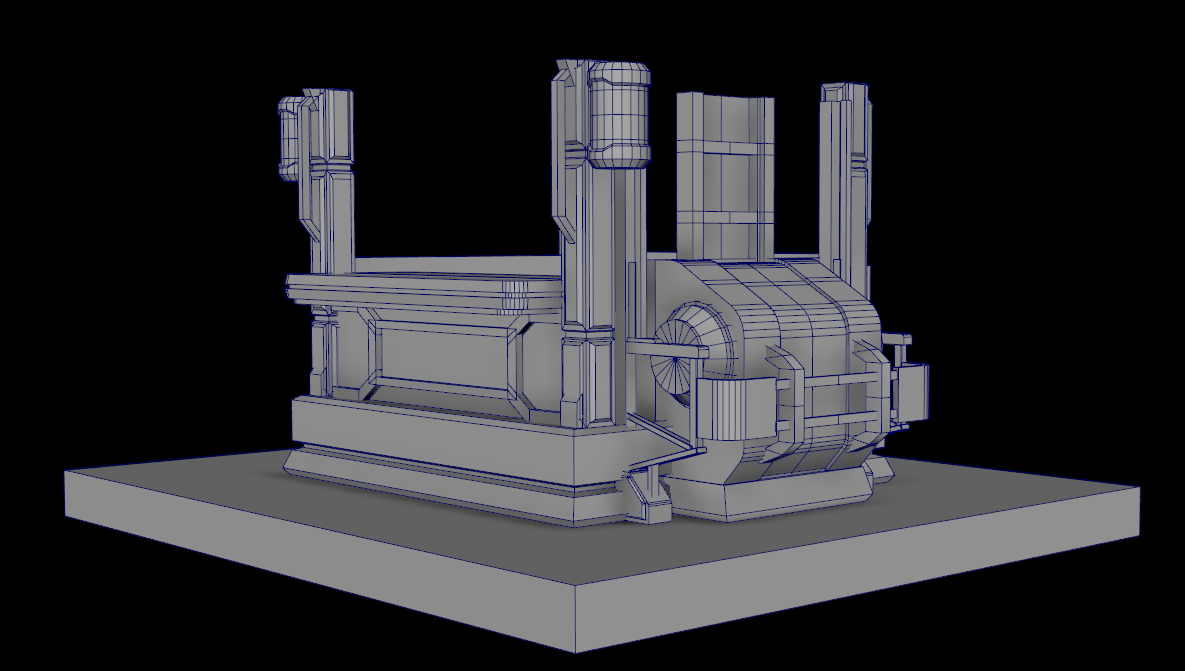
Trim sheet not used yet. Just Substance painting at the moment to get something down. But its the same materials as what I created so not much should be different.
Tuesday, July 7, 2020
Tuesday, June 30, 2020
Week 3 - Snack Bar
Status Update
- UV's for the trim sheet proved to be more difficult somehow. I had to troubleshoot a lot more than I had hoped.
- Trim sheet is done, just now its substance painter and some texture baking from Zbrush if needed. (Doesn't feel like I do though)
- Model is "Done". Just needs cleaned up and UV'd at this point.
- Not in engine yet.
I'll update this
post with more detailed information of what happened and how to avoid it (once
I figure it out fully that is). So far
I've made some fixes to it, but they're not permanent fixes right now.
PROGRESS SHOTS
Steps Currently Done for Trim Sheet Pipeline
Integration
- Created a reference image board for the product.
- Put all of the artist's work onto a Pure Ref and up resolution some portions of image for readability
- Used PureRef to gather images directly from Valorant and gathered reference for what type of detailing the textures would be.
- Went to Photoshop and cut and trimmed down the images to get just the texture desired. Straightened the image out and placed it onto a predefined trim sheet size to prep for making the high resolution FBX in Maya.
- Maya Creation
- Worked on a blocked out version of the building keeping into consideration the scale of a normal sized human.
- Polishing block out of building, refining as I go and fixing certain problem areas that I knew I needed to tackle to be ready for UV's.
- Semi-modularized assets to account for integration into UE4 and allowing for kit bashing if needed for other projects.
- Trim Sheet Creation
- Made seamless textures that pan across a square UDIM.
- Modeled set of tiles spaced out to allow for 7 different texture variations.
- Took it into Substance to match the style of Valorant.
Tuesday, June 23, 2020
Week 2 - Snack Bar
Status Update
- About 75% of the way done with the modeling phase for the asset. I realized that I won't be doing a high poly of the asset itself so I'll be doing only the high poly in a trim sheet format. I need to finish the backside and the interior now.
- Trim sheet idea content page is done, as well as a test trim sheet to show concept.
- Trim sheet mockup is done. We can test textures on the model once UV's are laid out nicely.
To Due Next Week
- Finish Low Poly / Final Model
- UV Layout
- High Poly of Trim Sheet
- Written Run through on Trim Sheet Creation process (at least my process)
We're about halfway
done with this project already. The trim
sheet should be something I actually should start out with when concepting it
seems like as its very important to know what pieces are going to be modeled in
and what type of trim sheet will you need to make that asset work.
For now I figure I
should have 2 different types of things:
- A trim sheet with major shapes and pieces (70% of detail)
- A trim sheet with minor shapes and pieces OR a unique UDIM page specific to the smaller assets. (30% of detail)
This way I'm able to
get the specific detail I want within the mesh, but also allow for the trim
sheet to be used in other places in the environment (if it had one around it)
to make things feel like they're built from the same product. I'm curious to see the result, especially
since I'm going to be mimicking Valorant
art style. Below is a ton of different
tutorials and documentation that I'll be updating as I find more things about
Trim Sheets or Floater Sheets (note, need to find out the differences within
trim and floater).
Trim Sheet Reference (Free)
- Polygon Academy's Trim Sheet Tutorial
- Reddit Article About Trim Sheets
- Game Textures Full Tutorial (Also adapting pipeline to Blender)
- Environment Iteration Through Trim Sheets by Markus Pichler
- Alex Senechal 80 Level Tutorial
- Alex Senechal Tech Industrial Trim-Sheet Breakdown
- Building a Desert Scene Using Trim Sheets
- Making a High Quality Sci-Fi Modular Environment (Garth Travis)
Extra Tutorials / Resources (Paid)
Polygon Academy
gives you the proper step by step process on how to achieve the results he gets
through a video format. Very easy to
follow and would recommend it for the beginning journey to learn trims. Then a lot of the information in these 80
Level documents or modular environment piece documents are about specific
things that others do slightly different so that’s good. Lastly, Alex also has an additional paid
content you can purchase that goes into more strict detail on how well you can
modularize everything it seems. I
haven't bought it yet, but in general he is incredibly knowledgeable about this
subject and absolutely worth checking out.
Also totally check out Alex Senechal's
Youtube channel. What he talks about on
his channel is super dope and definitely worth the time to work through
everything.
Now for progress
images.
Steps Currently Done for Trim Sheet Pipeline
Integration
- Created a reference image board for the product.
- Put all of the artist's work onto a Pure Ref and up resolution some portions of image for readability
- Used PureRef to gather images directly from Valorant and gathered reference for what type of detailing the textures would be.
- Went to Photoshop and cut and trimmed down the images to get just the texture desired. Straightened the image out and placed it onto a predefined trim sheet size to prep for making the high resolution FBX in Maya.
- Maya Creation
- Worked on a blocked out version of the building keeping into consideration the scale of a normal sized human.
- Polishing block out of building, refining as I go and fixing certain problem areas that I knew I needed to tackle to be ready for UV's.
- Semi-modularized assets to account for integration into UE4 and allowing for kit bashing if needed for other projects.
Monday, June 15, 2020
Week 1 - Snack Bar
Current progress on where we are with the Snack Bar. Major shapes are done, just got to add a lot of minor details to make everything work.
Schedule
Week 1 - Block Out
Reference board that I'm working on. Will get some images for the actual textures as I finish the model more, I'm going to be making a trim sheet for this to eliminate as much custom modeling as possible but rather trying to make a system work within a sheet.
I plan on getting some good industrial images complimented by a food truck style system. Next week I'll have the most completed design. For now here is specifically Valorant's metal figures textures and designs on a Pure Ref board that helps with texturing in their style.
Schedule
Week 1 - Block Out
Week 2 - Low Poly / Start Trim Sheet Start
Week 3 - Trim Sheet Finish / UVs
Week 4 - UE4 Integration / Lighting
Tuesday, June 9, 2020
Week 4 - SY Tech Turn in, but Not Really.
Here is week 4 for my turn in for the SY Tech project. I'm noodling around with the lighting effects, and fixing up some issues with the texturing before finalizing some details. I plan on adding decals and extra set dress pieces to help bring everything together. The room seems sorta empty right now. Plan to see a weekly update to this project going forward for I am not done with making it into something.
Here is some IRay shots that I took of the current assets. Until I have everything I want it to look like in engine these are gonna be my beauty shots.
And lastly a lonesome Maya shot. Actually 2 assets are missing from this if I remember correctly, the Underwall and the upper deck. I'll get them in when I do polish though.
Tuesday, June 2, 2020
Week 3 - SY Tech UVs (Part 1)
Today is just UV day. First bake will happen once I organize the files a bit more. Geo in certain meshes still need to be trimmed down, but overall this is where we are for final objects. I kept a lot of the back faces that normally you wouldn't see in these meshes due to if I ever need to split them up I already have them textured.
Currently rocking 9 UDIM slots for all of the assets I have right now. Will have probably 11 UDIM's made for these assets. Expect to see an update by Thursday of first bake. For now this is where I am at.
Subscribe to:
Posts (Atom)